How to run AI on the articles that are already screened by Human Reviewers?

How to run AI on the articles that are already screened by Human Reviewers?

EasySLR allows you to run AI on articles after they’ve been screened by human reviewers. Just follow the steps below to initiate the AI run and compare with the human decisions. If any differences arise, the Conflict Analysis tool helps you understand patterns in reviewer disagreements, refine your protocol, and improve overall decision consistency.

Step 1: Go to the Settings

Step 2: Open AI copilot section

Step 3: Click Rerun AI for Title Abstract AI Suggestions Refresh

Step 4: Choose "With final decision" option and rerun AI
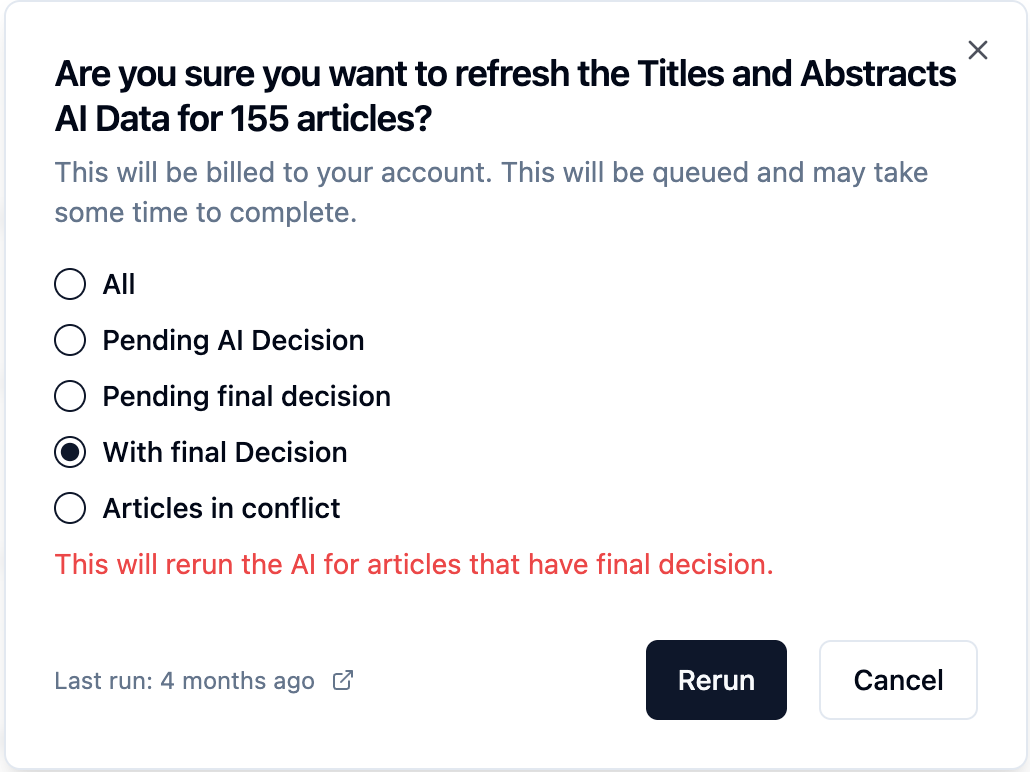
The AI will screen only the articles for which the final decision exists.
  1. Check the Statistics section to see AI performance
  2. Use AI conflict analysis tool for suggestions to refine your protocol and improve consistency across decisions
Need Help?
Reach out to us via the Live Chat option in EasySLR or email us at support@easyslr.com.


    • Related Articles

    • How to Compare AI vs Human Reviewer Decisions in EasySLR?

      EasySLR allows you to assess the accuracy and reliability of its AI-driven screening by directly comparing AI decisions with those made by human reviewers. This validation step helps you understand how closely the AI aligns with your decision-making ...
    • AI as the Only Reviewer in EasySLR

      What is “AI as the Only Reviewer”? The AI as the Only Reviewer feature in EasySLR allows the AI to independently perform screening — making inclusion/exclusion decisions across your dataset without requiring input from a human reviewer. How to Enable ...
    • Protocol Text Review & AI Performance Analysis

      EasySLR is designed to help reviewers streamline their workflows and make evidence-based decisions faster. Two powerful features — Protocol Text Review and AI Performance Analysis —ensure your review protocol is aligned, AI-ready, and easy to ...
    • How to Enhance AI Performance for Optimal Results?

      EasySLR’s AI can streamline screening by providing inclusion/exclusion suggestions based on your protocol. However, to get the best results, it's important to first calibrate the AI to ensure it aligns with your decision-making. The steps below ...
    • Comparing AI Assistant and AI Reviewer in EasySLR

      EasySLR utilises advanced artificial intelligence to streamline and enhance the article screening process. Within the platform, two key AI features play pivotal roles: the AI Assistant and the AI Reviewer. While both are designed to enhance ...